AI Bold Geometry Product Background Maker
About
AI Bold Geometry Product Background Maker
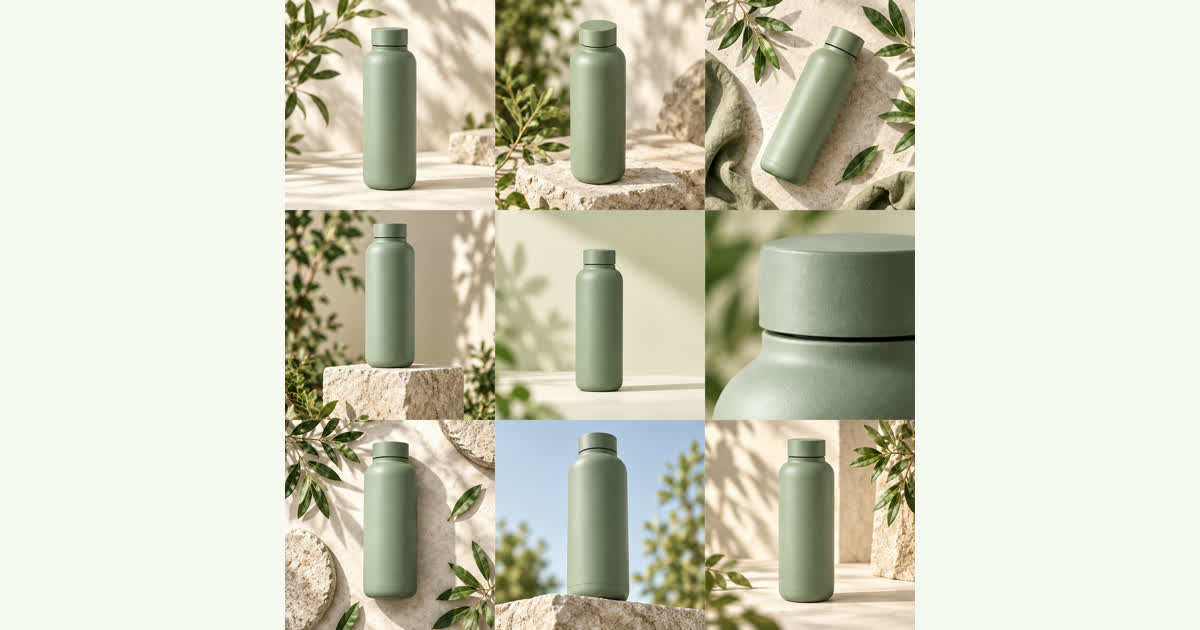
Turn a single product photo into a grid of bold geometric backgrounds. Compare compositions on a contact sheet and download separate PNG files for your ad concepts.
How it works
How to Generate Geometric Backgrounds
Every sheet is generated by an AI image model that uses your photo as a reference. It may change labels, shape, texture or fine details, so review each image before you use it in a listing or ad.
- 01
Upload Your Photo
Upload a single product photo to the tool. Choose the bold geometry visual direction from the available settings to ensure the generated backgrounds feature distinct shapes and structural elements.
- 02
Generate the Sheet
Spend 250 credits to generate one square contact sheet. The tool will process your photo and return a grid containing either 4 or 9 different geometric background concepts.
- 03
Cut the Grid
Select how you want to cut the contact sheet. The browser divides the square into a 2×2 or 3×3 grid, producing separate PNG files for each geometric composition.
- 04
Download Your Files
Download your individual PNG files. You can save specific geometric layouts one by one, or download all of them together in a single ZIP file for your ad campaigns.
Each sheet costs 250 credits ($1), and a one-time $5 purchase covers 5 sheets with no subscription. Confirmed failed generations return their credits.
Tool Features for Geometric Layouts
Create sharp, structural compositions for your products using the bold geometry setting.
Bold Geometry Direction
The bold geometry visual direction places your product among distinct shapes and solid structures. Instead of soft gradients or plants, this setting generates hard lines and architectural elements. You upload one product photo, and the tool builds a square contact sheet filled with these structural background concepts for your review.
Grid Generation
Each generation costs 250 credits and produces a single square contact sheet containing multiple geometric concepts. You do not get just one image; you get a grid of variations from your single product photo. This allows you to compare different geometric arrangements side by side before deciding which layout fits your current advertising concept.
In-Browser Splitting
Once the contact sheet is ready, the tool cuts it into separate images directly in your browser. You can choose a 2×2 grid to get 4 separate images, or a 3×3 grid to get 9 separate images. These individual geometric concepts are saved as PNG files, ready for you to download as a ZIP or individually.
Resolution Details
When you choose the 3×3 grid option, the tool cuts the main square contact sheet into 9 pieces. Each of these crops has exactly one third of the original sheet's width and height. Because they are fractions of the main sheet, these 3×3 crops are not full resolution, making them suitable for quick concept reviews rather than final large prints.
Free Splitting Tool
If you already have a 2×2 or 3×3 contact sheet from a previous session, you can split it into separate PNG files for free. This splitting process happens entirely in your browser. You do not spend any of your credits to cut an existing sheet into 4 or 9 individual geometric background images.
Pricing and Refunds
You pay for credits through FloatPass. A $5 one-time purchase gives you enough credits for 5 contact sheets, with no recurring subscription. Each sheet costs 250 credits. If a generation fails and the system confirms the failure, your credits are returned to your balance so you can try generating your geometric backgrounds again.
Uses for Geometric Product Backgrounds
Ad Agency Pitches
An art director preparing a pitch needs multiple layout ideas fast. They upload a client's product photo and generate a 3×3 contact sheet in the bold geometry style. They download the 9 low-resolution PNG crops to place into a presentation deck, showing the client different structural compositions for an upcoming campaign.
Social Media Testing
A social media manager wants to test which background shape gets more clicks. They generate a 2×2 sheet and download the 4 separate PNG files. They run a split test with the different bold geometry layouts in their ads to see which structure performs best with their target audience.
Product Catalog Updates
A small business owner wants a consistent, modern look for a new product line. They use the bold geometry setting to create a contact sheet. They cut it into a 2×2 grid and use the 4 individual PNG images to update the product gallery on their online store.
Email Marketing Campaigns
A marketing team needs a striking header image for a promotional email. They take a standard product photo, apply the bold geometry direction, and generate a grid of options. They pick the most striking PNG crop from the separated sheet and insert it into their email template.
Your uploads
How your product photos are handled
Photos are uploaded only when you sign in and generate, and they are used to create your contact sheet. The privacy policy has the full notice.
Read the privacy policyHow much does it cost to generate a geometric contact sheet?
Each generation makes one square contact sheet and costs 250 credits. You can buy credits through FloatPass. A $5 one-time purchase covers 5 sheets. There is no subscription required to use the tool. If a generation fails and is confirmed as a failure, the credits are returned to you.
What format are the separated geometric images?
The tool cuts the main square contact sheet into individual images directly in your browser. These separated images are formatted as PNG files. You can download these PNG files individually, or you can download all the separated images at once in a ZIP file.
Are the individual images high resolution?
It depends on how the sheet is cut. When you cut the sheet into a 3×3 grid, you get 9 separate images. Each crop of a 3×3 sheet has exactly one third of the original sheet's width and height. Because of this, the individual crops from a 3×3 sheet are not full resolution.
Can I use a different style instead of bold geometry?
Yes, the tool offers three distinct visual directions for your product grids. Along with the bold geometry option, you can also select soft studio or botanical. Each visual direction applies a different aesthetic to the contact sheet generated from your single uploaded product photo.
Does it cost credits to split a contact sheet I already generated?
No, splitting a 2×2 or 3×3 sheet that you already have is completely free. The splitting process happens locally in your web browser. You do not need to spend any of your 250 credits to cut an existing contact sheet into 4 or 9 separate PNG files.
How many product photos do I need to upload?
You only need to upload one product photo per generation. The tool takes that single image and turns it into a full square contact sheet containing multiple different advertising concepts in your chosen visual direction, such as the bold geometry setting.
How do I contact support if I have an issue?
If you encounter a problem with your generations or your FloatPass payment, you can reach out for support via email. Send your questions or issues to contact@productgridai.com. The site is also available in both English (en) and Chinese (zh) languages.
Contact
Make Your Geometric Ad Concepts
Turn one product photo into a grid of bold geometric backgrounds today.