
The product photo contact sheet
AI 3x3 Product Concept Sheet Generator
Turn one product photo into a nine-image contact sheet. Choose a visual direction, generate the grid, and let the browser cut it into nine separate PNG files for your mood boards or client presentations.
Your next set of shots
Botanical · 3 × 3 · 9 crops · PNG
Choose a product photo, or try a sample.
My creations ↗One bottle. Nine directions.
BOTANICAL / 3 × 3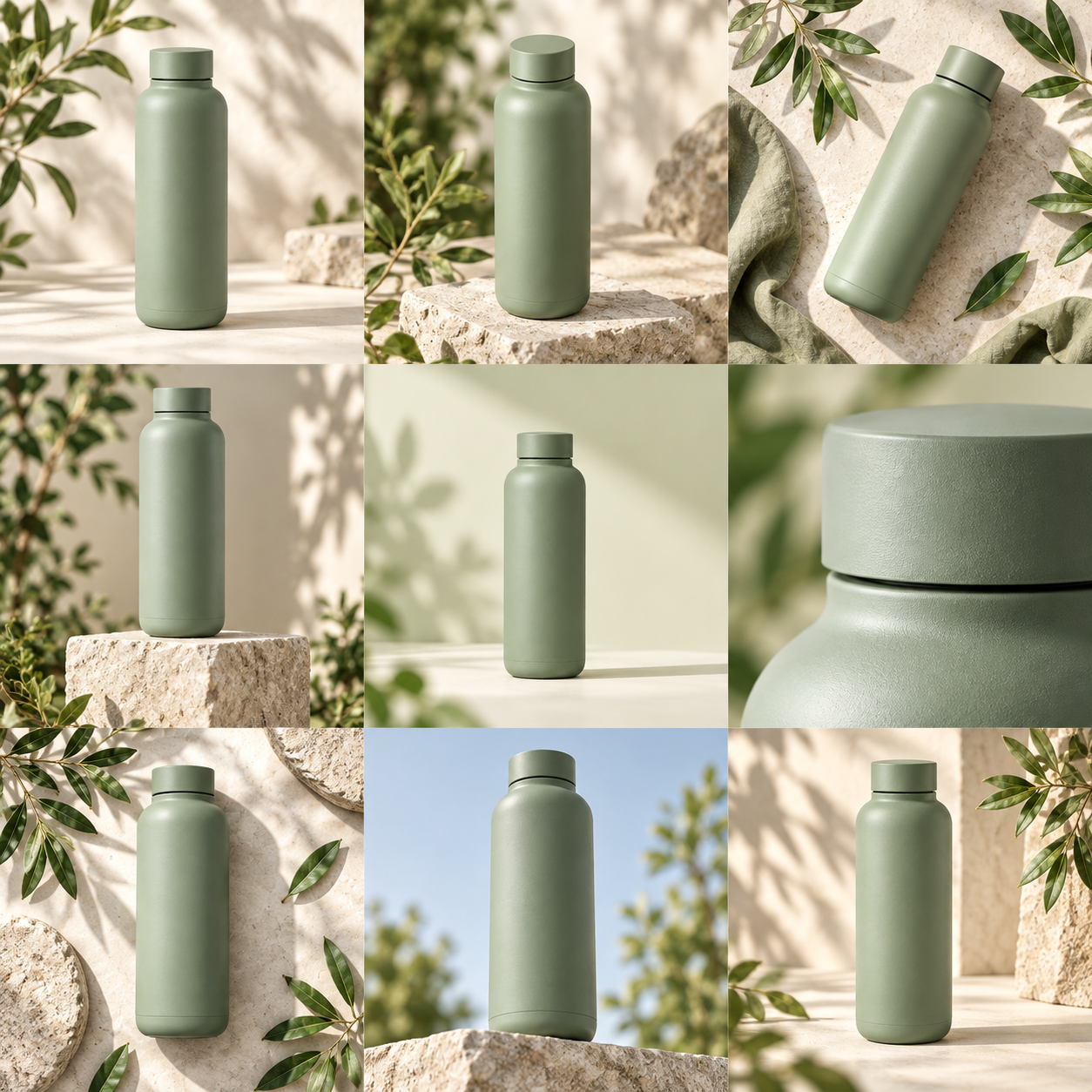
Start with your product
One clear photo on a simple background. Shape and color come first.
See the possibilities together
Choose four or nine concepts. Compare light, props and composition at a glance.
Keep what works
Review product details, then download the sheet, a single image, or your picks as a ZIP.
Five sheets. Fresh possibilities.
One purchase, no subscription. Each run makes one sheet, then four or nine crops.
What the 3x3 concept generator does
See how the tool builds and divides a nine-image grid from your initial product photo.
Nine concepts from one photo
Upload a single product image to generate a square contact sheet containing nine distinct advertising concepts. The tool processes your photo and returns a complete 3x3 grid. This format gives you multiple compositional ideas to compare and review at the exact same time, allowing you to evaluate different angles and placements without running nine separate generations from scratch.
Three visual directions
You control the setting for your nine concepts by selecting one of the three available visual directions. Choose Soft studio for a clean and minimal look, Botanical for natural plant-based elements, or Bold geometry for highly structured shapes. Every single image within your generated 3x3 grid will consistently follow the specific visual direction you select before generation.
Automatic browser splitting
Once the AI generates your square contact sheet, the tool cuts it into nine separate images directly in your browser. You do not need to open external photo editing software to slice the grid yourself. The tool automatically prepares each of the nine segments as individual PNG files, ready for you to review, compare, and download to your computer.
Cost and credit usage
Generating one complete 3x3 contact sheet costs exactly 250 credits. A single [$5 one-time purchase](/pricing) provides enough credits to generate five complete sheets, which equals 45 individual concept images in total. There are no recurring subscriptions required to maintain an account, and you process your credit payments securely through the FloatPass payment system when you need more.
Free grid splitting
If you already have a 3x3 or a 2x2 contact sheet from a previous session or from another source entirely, you can use the tool to split it for free. This slicing process happens entirely in your local browser. It requires absolutely no credits to cut an existing square sheet into separate PNG files for your immediate use.
Image resolution details
Because the tool generates one large square contact sheet, each crop of a 3x3 grid takes up exactly one third of the sheet's total width and height. These nine individual crops are not full resolution images. They have smaller dimensions, making them specifically suited for early concept reviews, building mood boards, and planning general layout compositions.
How to generate a 3x3 product sheet
Upload your product photo
Select a clear, well-lit image of your product and upload it directly to the tool. This single photo serves as the foundation for all nine concepts in your grid, so ensure the product is fully visible.
Select a visual direction
Choose between the Soft studio, Botanical, or Bold geometry settings. This choice dictates the background environment, lighting style, and prop elements that will appear consistently across all nine of the generated advertising concepts within your final square grid.
Generate and split
Spend 250 credits to create the sheet. The tool produces one single square grid and immediately slices it into nine separate images right in your browser. You can watch the 3x3 grid separate into individual files.
Download your PNG files
Review the nine individual concepts generated from your photo. You can download specific images one by one as PNG files, or you can choose to download all nine together packaged in a single ZIP file.
When to use a 3x3 concept sheet
Client pitch preparations
When pitching a new campaign to a client, you need to show multiple visual directions quickly. Generate a 3x3 sheet to provide nine distinct layout ideas using the Bold geometry style. You can paste the nine resulting PNGs directly into a presentation deck to discuss composition and overall art direction before committing budget to a final design.
Mood board construction
Art directors building mood boards for upcoming product shoots require clear visual references. Upload a basic product shot and select the Botanical direction. The resulting nine images serve as practical lighting and prop references. This gives the photography team concrete examples of how the product interacts with plant elements before they start building the physical set.
Internal team reviews
Marketing teams often debate which visual approach fits a new product launch best. By generating a 3x3 sheet in the Soft studio style, you provide nine distinct variations for the team to review at once. The lower-resolution crops are sized appropriately for pasting into internal documents for a quick team vote on the preferred direction.
E-commerce layout testing
Store owners planning a new category page can use a 3x3 sheet to see how different product angles and backgrounds look side-by-side. Generating nine concepts at once allows you to thoroughly test the visual density and flow of a grid layout before you pay to produce the final, high-resolution photography for the live website.
Social media grid planning
Content planners mapping out a nine-square grid for social profiles can generate a 3x3 sheet to test overall color cohesion. By splitting the sheet into nine separate PNGs, you can arrange them in your scheduling tool. This lets you see exactly how the Soft studio or Bold geometry backgrounds flow from one square to the next.
Packaging design mockups
Designers working on new packaging concepts need to see how the physical product looks in various environments. Generate a 3x3 sheet to place the product in nine different settings. You can review these nine PNG files to determine which visual direction highlights the packaging details and typography best before finalizing the commercial print files.
A few things to know.
How many credits does a 3x3 sheet cost to generate?
Each generation makes one square contact sheet and costs exactly 250 credits. This single generation provides the full 3x3 grid, which the tool then automatically cuts into nine separate images in your browser. You do not pay per individual image; the 250 credits cover the entire nine-concept sheet. For context, a [$5 one-time purchase](/pricing) covers five complete sheets, so you know exactly what you are spending before you begin.
Are the nine images high resolution enough for print?
No, the individual images are not full resolution and are not intended for large print formats. The AI generates one single square contact sheet. When the tool cuts a 3x3 sheet, each of the nine resulting crops has exactly one third of the original sheet's width and height. Because they are smaller crops of a larger image, they are best utilized for digital mood boards, concept reviews, and internal presentations.
How do I pay for the credits to make a sheet?
Payments for credits are processed securely through FloatPass. You can make a $5 one-time purchase, which covers the cost of five contact sheets. There is absolutely no subscription required to use the tool. You only buy credits when you specifically need to generate new product concepts. This simple payment structure ensures you are never charged on a recurring monthly basis for a tool you only use occasionally.
What happens to my credits if the 3x3 generation fails?
If the tool encounters an unexpected error and fails to generate your contact sheet, your credits remain safe. Confirmed failed generations automatically return the 250 credits directly to your account balance. Once the credits are refunded, you can try uploading your product photo and generating the 3x3 grid again without having to purchase a new pack of credits through FloatPass.
Can I cut a 3x3 sheet I already made elsewhere?
Yes, splitting a 3x3 or a 2x2 sheet you already have is completely free. You can upload an existing square contact sheet, and the tool will cut it into separate PNG files directly in your browser. Because this process happens locally in the browser, it requires no credits. You can use this free feature as often as you need to slice existing grids.
What visual styles can I choose for the nine concepts?
There are three distinct visual directions available for your product concepts. You can select Soft studio for a minimal look, Botanical for plant elements, or Bold geometry for strong shapes. Whichever style you select prior to generation will be applied consistently to all nine images within the generated 3x3 contact sheet. You cannot mix and match styles within a single 250-credit generation.
How do I receive the nine separated images after generation?
After the tool cuts the square sheet in your browser, it provides the nine distinct segments as standard PNG files. You have two options for saving them. You can choose to download these individual PNGs one at a time, or you can download all nine images together, packaged in a single ZIP file for easier file management on your computer.
What languages does the concept sheet generator support?
The tool's interface is available in two languages. You can use the site in English (en) or Chinese (zh). All the features, including the grid generation, the free browser splitting, and the FloatPass payment system, function identically regardless of which of the two supported languages you choose to navigate the site with.